Built for reading what your agents wrote
A fast, native Git client for the Mac.
One-time price. No subscription. No AI inside. Your agents write faster than you can read; Meridian is where you read it. cd into any repo or worktree, even the one your agent is using right now, type mrd, and it opens in under a second. Read the change, stage it, commit it. One window per worktree.
One licence, three Macs | Apple silicon + Intel
Why Meridian
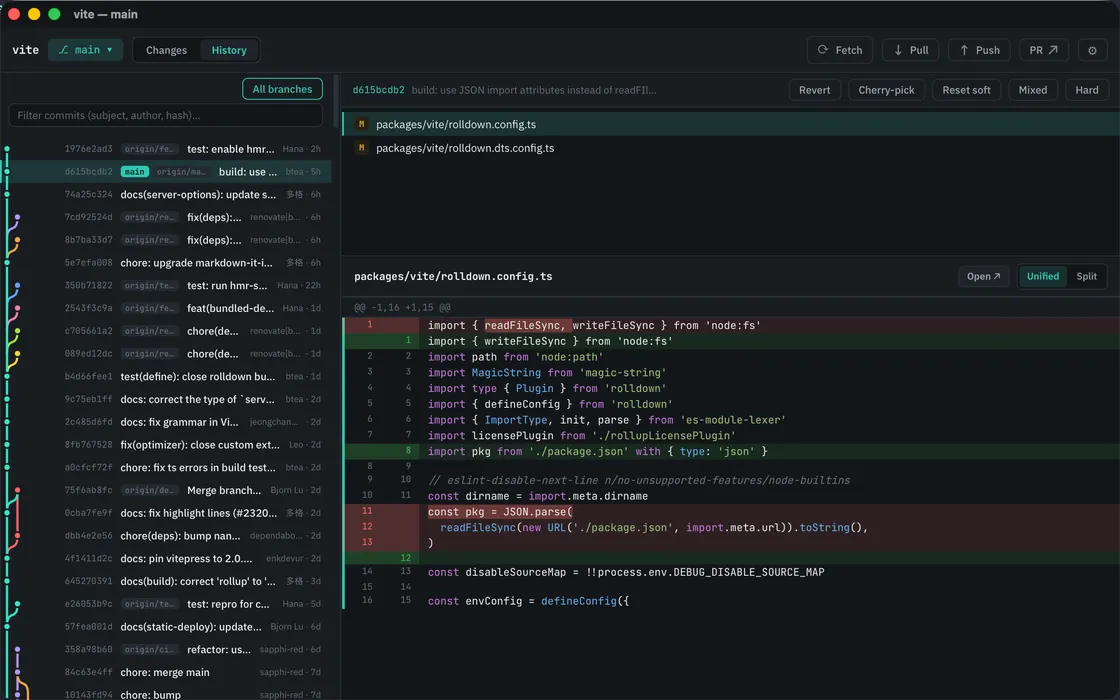
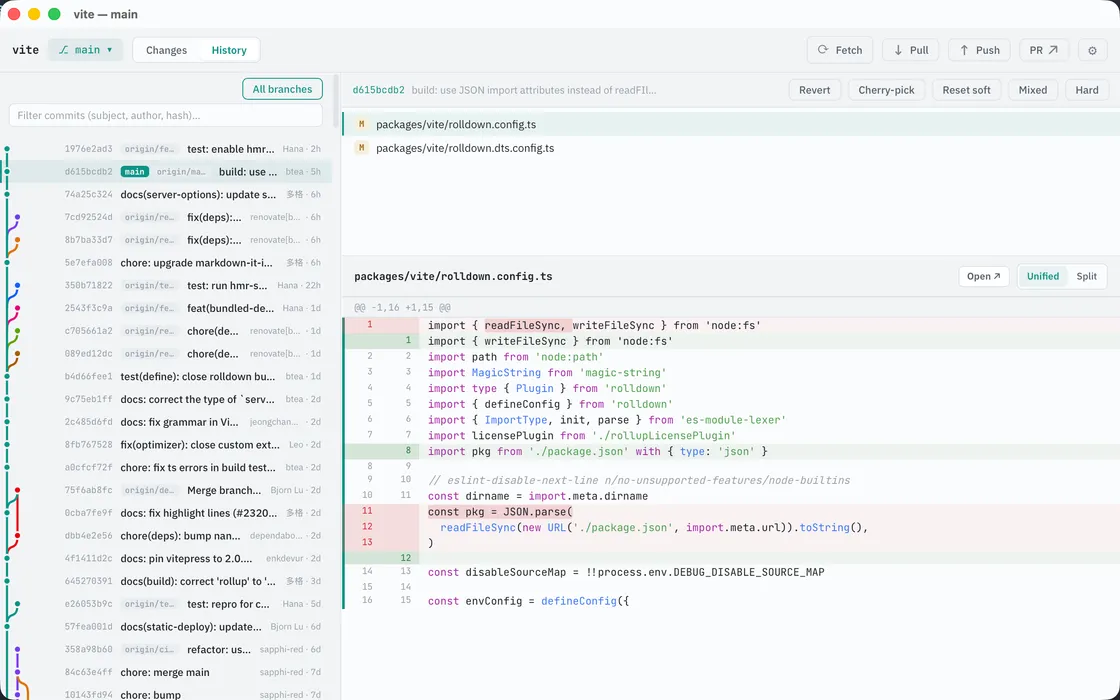
Your agent writes the code, the specs and the READMEs. You're the one who has to read them. In a line diff, a reworded paragraph is a wall of red and green, and an image dead-ends at "Binary file".
Why Meridian
Your agent writes the code, the specs and the READMEs. You're the one who has to read them. In Meridian, a reworded paragraph reads as prose, and an image renders instead of dead-ending at "Binary file".
The terminal
Three agents. Three worktrees. Three windows.
Agents create worktrees without telling you. Meridian meets you there: cd in, type mrd, and the worktree opens in its own titled window. Run three sessions and you have three windows you can tell apart, not three tabs fighting over one. No project setup, no "add repository" step.
Rich preview
Review the change, not the diff.
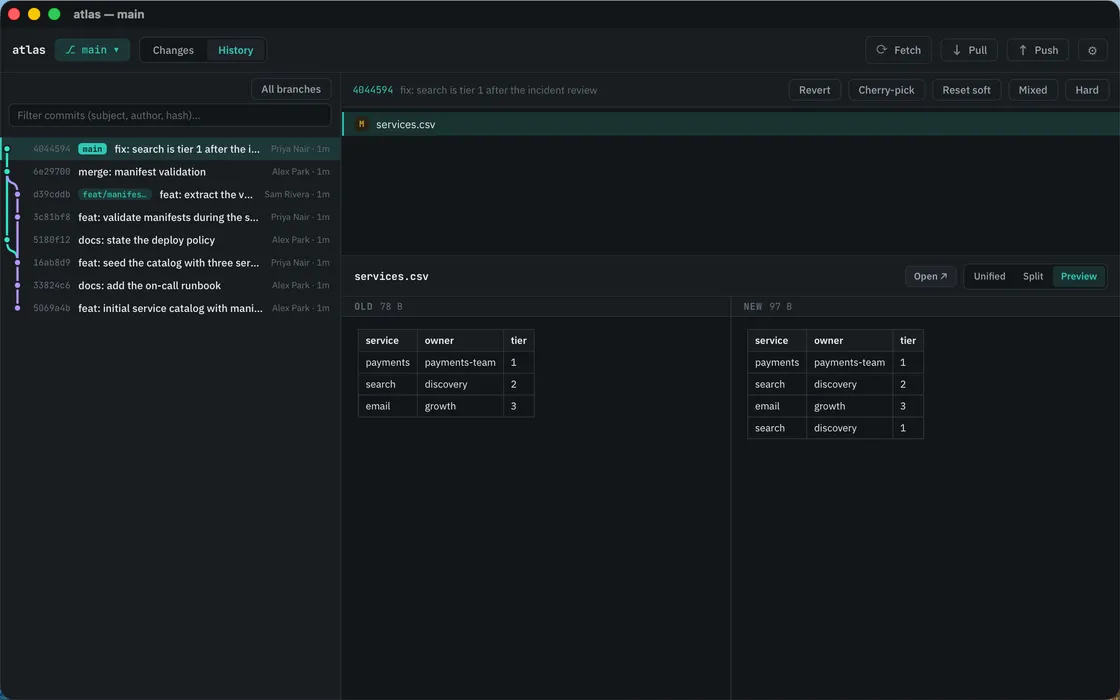
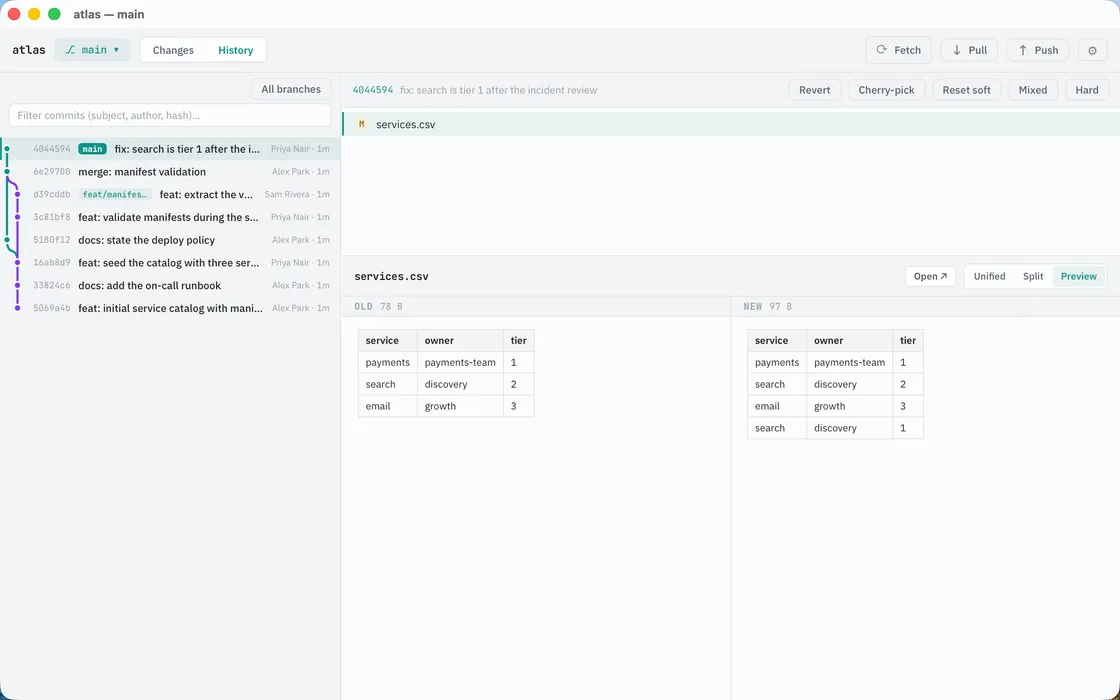
A reworded paragraph is a wall of red and green in a line diff. An image dead-ends at "Binary file". Meridian adds a third diff mode: rendered preview, Markdown, images, SVG, CSV and JSON drawn as themselves, old version beside new, scrolling in sync. Prose reads as prose. Data reads as data. Agents write specs, plans and READMEs; this is what reading them looks like.
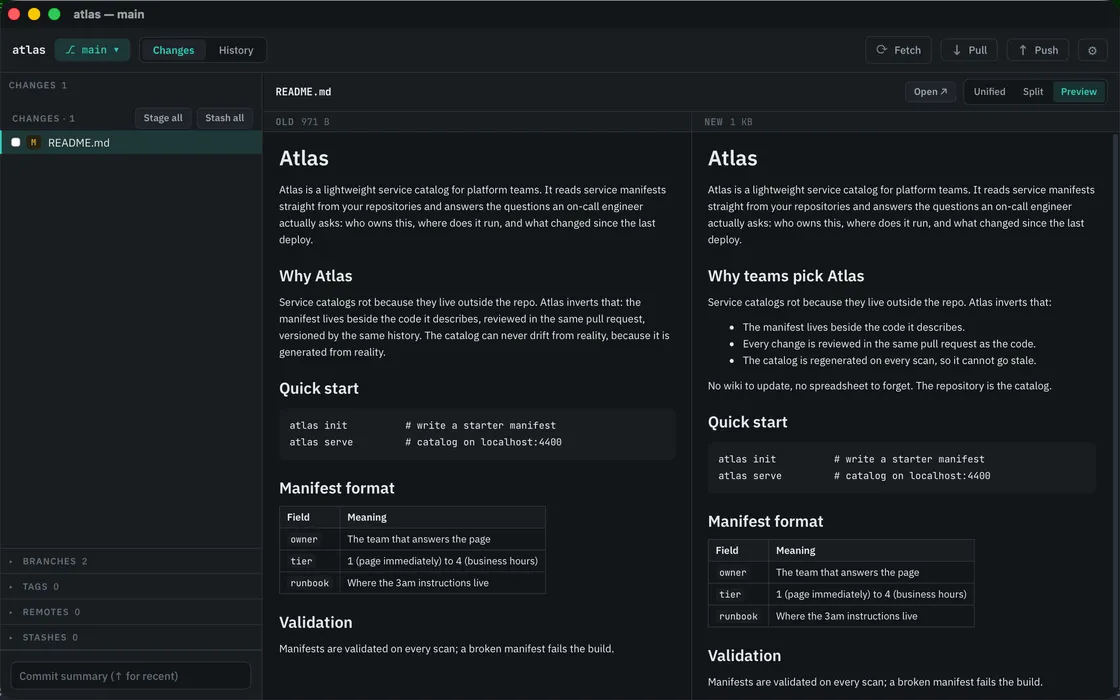
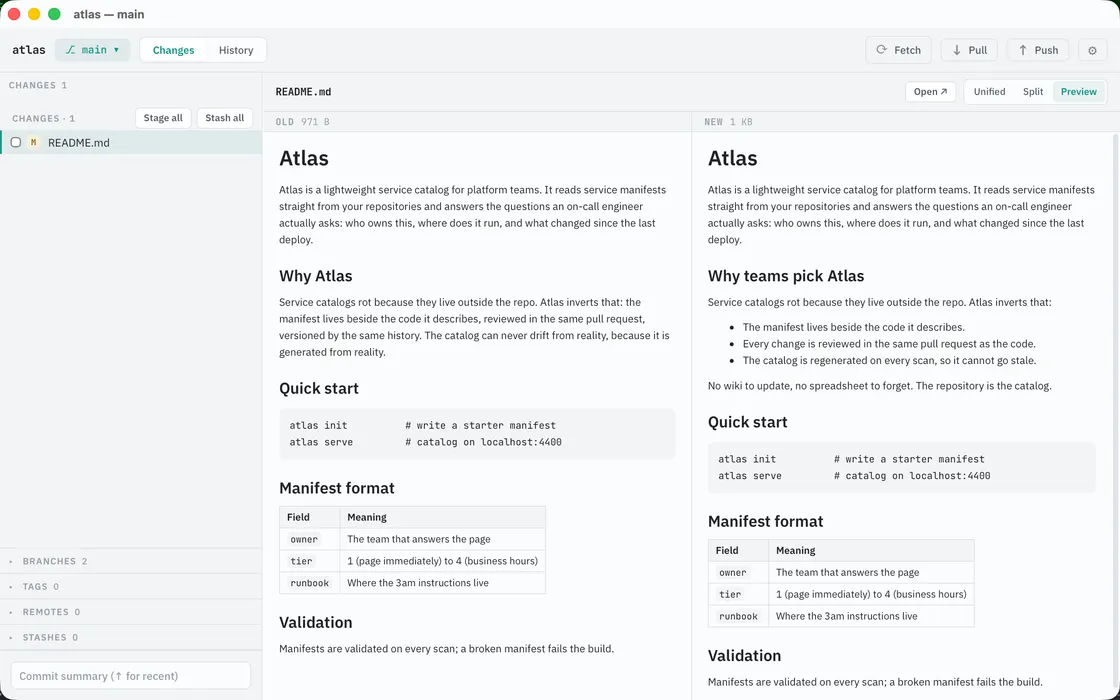
No other Git GUI renders prose and data diffs as documents.
Fork, Tower, Sublime Merge, GitKraken, GitButler and SourceTree all line-diff them. See it on a Markdown diff
The full client
Then commit it.
The free diff viewers can show you a change; they can't commit one. Meridian takes you the rest of the way: stage by file or by hunk, commit, amend, undo. Branch, merge, rebase, cherry-pick, revert, reset. Tag any commit. Stash, a single file if that's all you want. Resolve conflicts, ours, theirs, or both, for merges, reverts and rebases alike. Right-click a commit, branch or tag for everything you can do with it.
Under the hood
Your git, exactly as configured.
Meridian shells out to your system git. SSH keys, credential helpers, hooks and commit signing (commit.gpgsign) work exactly like your terminal, because it is your terminal's git. Nothing hangs on an invisible password prompt, and any fetch, pull or push cancels mid-run.
Fast on repos that hurt.
Native, and fast on big repos: on nixpkgs, a 53,000-file checkout, status lands in about 0.8 seconds, git's own floor, and the UI never blocks.
No AI inside.
No commit-message generator, no built-in reviewer, no API keys to configure. You already have agents; Meridian is where you do the reading.
Pricing
One price. Three Macs. No subscription.
Meridian runs on your Mac, against your disk. There's no cloud to fund and no AI bill to pass on, so there's nothing to subscribe to.
Launch price. Going up to $49 soon.
One licence covers three Macs: desk, laptop, and the next one. Personal and commercial use, same licence.
12 months of updates included. After that the app keeps working, forever. No lockout, no nag.
Terms stated plainly: trial, update window, machine count. The details you usually have to email support to learn. The download is the trial.
Your licence key is emailed the moment checkout completes, and it works whether or not you have installed Meridian yet.
FAQ
Questions, answered.
What is Meridian?
A fast, native Git client for macOS. It opens from the terminal (mrd) in under a second, one window per repo and per worktree, and renders Markdown, images, SVG, CSV and JSON as themselves in diffs, old version beside new.
How much does it cost?
$29 one-time, the launch price. It goes up to $49 soon. One licence covers you on three Macs, personal and commercial use, with 12 months of updates included. After that, the app keeps working as-is, forever.
How long is the trial?
14 days, hard stop. Give Meridian your email before the trial ends and it extends to 30 days.
Is it a subscription?
No. One payment. Updates past your first 12 months are optional, never required.
What platforms does it run on?
macOS only, Apple silicon and Intel, one universal binary. There is no Windows or Linux version.
Does it work with worktrees?
Yes, this is a favorite. Every worktree gets its own window, titled with its branch. mrd opens whichever worktree you're standing in, including ones an agent created moments ago. Create or remove a worktree from the app (⌘⇧W), or open any branch as a worktree in a new window. New to worktrees? Read the guide
Does it work with coding agents like Claude Code or Codex?
Yes, that's the workflow it's built around. Agents create worktrees; mrd opens whichever one you're standing in, each in its own titled window, so parallel sessions stay legible. Mark files as reviewed while you read; if an agent edits one afterward, Meridian flags it. Compare an agent's branch with main, blame a line to see which commit wrote it, and send a diff back to your agent as a ready-made prompt. Meridian doesn't run or configure your agents, and it has no AI of its own: it's where you read what they wrote and commit it.
Does Meridian use AI?
No, deliberately. No AI commit messages, no built-in reviewer, no API keys. You already have agents for the writing; Meridian is the reading side.
Will my hooks, SSH keys and commit signing work?
Yes. Meridian shells out to your system git, so credential helpers, hooks and commit.gpgsign behave exactly as they do in your terminal.
How is it different from Fork or Tower?
Meridian opens straight from the terminal, gives every worktree its own window, and renders prose and data diffs as documents. No other Git GUI does those today. Fork and Tower are excellent general clients; neither treats the terminal as the front door, and Fork's AI reviews the code for you, where Meridian is built for you to read it yourself. See the full Meridian vs Fork comparison
What doesn't it do (yet)?
Interactive rebase, submodules, Git LFS and line-level staging are not there today. Rebase, blame and tags are. If your workflow leans on the missing ones, Meridian isn't your client yet. The trial will tell you in five minutes.
Get Meridian
Read what your agents wrote. Then commit it.
A fast, native Git client for the Mac, $29 once. One window per worktree, Markdown, images and data rendered as themselves, and the review ends in a commit.